November 16, 2026
Creating Apple II animation disks from GIFs with GifII
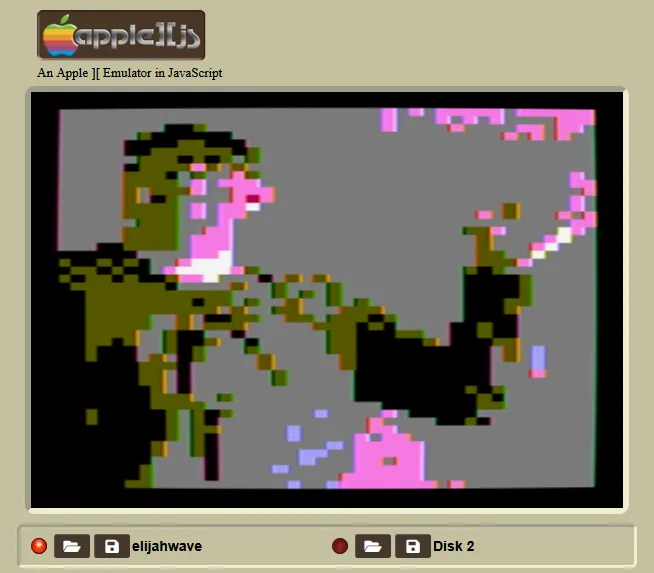
After this blog had sat dormant a bit too long, I finally got around to completing another hobby project: introducing GifII, an open-source C++ application that generates 140KB animation disk images for the Apple II. You provide a GIF and the program converts it to a sequence of Apple II Lo-Res Graphics, and displays them in an infinite loop. It packages the frames and display code into a ready-to-boot ProDOS disk that you can run in an Apple II emulator or (theoretically) on real Apple II hardware that supports ProDOS. Here's some samples of GifII animations in action:
| Original GIF | GifII Animation |
|---|---|
 |
 Download Disk Image |
 |
 Download Disk Image |
 |
 Download Disk Image |
 |
 Download Disk Image |
You can download a GifII release to try for yourself, or view and fork the source code, on my GitHub page. If you make any cool animations with this tool, please feel free to send them to me via email!
This project was really fun and extremely educational. I wrote all of my own code by hand, and learned a ton about retro computing architecture and software, BASIC programming, and the dedicated homebrew community that persists for the Apple II and related hardware. Working with, and against, the limitations of the older machine was really exciting, and seeing GIFs come to life on the old hardware, however pixelated and quantized they may be, was an awesome feeling.
Inspiration
A couple months ago, I signed up for my local makerspace. The amount of cool tools and technologies in there could be a blog post all on its own, but the thing that immediately inspired me was the vintage computer collection. They have a ton of awesome legacy PCs, but I was most interested in the Apple II systems they had, as they were the most immediately recognizable to me. The beautiful aesthetic of these retro machines still holds up! I quickly decided it would be fun to make something that I could run on one of these machines.
After looking around online, I found out how much work had gone into preserving and growing the Apple II software library. I downloaded AppleWin, figured out how to boot up the included ProDOS disk and began playing around with Applesoft BASIC. Reading about the lo-res and high-res graphics support intrigued me, and it didn't take long to find out the vast amount of tools that developers have built for converting images into Apple II graphics, like Bmp2Hdr, HRGTool, Buckshot, and others. I realized that if I developed a way to convert the frames of a GIF to graphics and wrote a BASIC program to chain them together, it would be possible to crudely display GIF animations on a real Apple II.
Unfortunately, I haven't been able to test it on real Apple II hardware yet, as the machine I had access to was having trouble accessing the disk drives. But I'm hoping to get a disk running on a real Apple II soon; if you test it on a real machine, please reach out to me and let me know how it goes!
How it works
The first-party code for GifII is ultimately pretty small and straightforward. Here's how it works:
- The user provides a file path to a GIF.
- It parses the GIF using the EasyGifReader library. If the GIF is too many frames to fit on a ProDOS disk, some frames will be omitted from the final animation.
- Each frame of the GIF gets cropped down to a 40x48 resolution, Apple II's native lo-res size.
- Each pixel gets its closest color match in the Apple II palette.
- Pixels get written as four-bit values, two at a time (i.e. as one byte), in Apple II's expected memory structure.
- All the animation frames get written as binary files onto a template disk image, which already has ProDOS, Applesoft BASIC, and a BASIC program I wrote to load and display the images.
While it's pretty easy to conceptualize, I did face some tricky challenges I had to overcome in executing this approach.
Getting the picture
First, a brief overview of how graphics work on Apple II (you can find more detailed explanations here and here). The system has two main graphics modes, Lo-Res and Hi-Res:
- Lo-Res mode draws images at a 40x48 resolution, with each pixel represented by four bits that correspond to a color on the system's preset 16-color palette (though gray's on the list twice). Each Lo-Res display ends up taking up 1 kilobyte: 960 bytes for the pixels, and 64 bytes for the "screen holes" of extra memory the system uses for program tasks (more on this later). Lo-Res memory is the same as text memory, so by default Lo-Res graphics are 40x40 with 8 rows of text left at the bottom, but there's a software switch that allows full-screen Lo-Res. This also means typing on the screen alters the graphics!
- Hi-Res mode draws images at a much higher 280x192 resolution, but only supports six colors (technically eight, but white and black are on the list twice). A Hi-Res graphic takes up a whopping 8KB of memory, but doesn't overlap with the text memory the way Lo-Res graphics do.
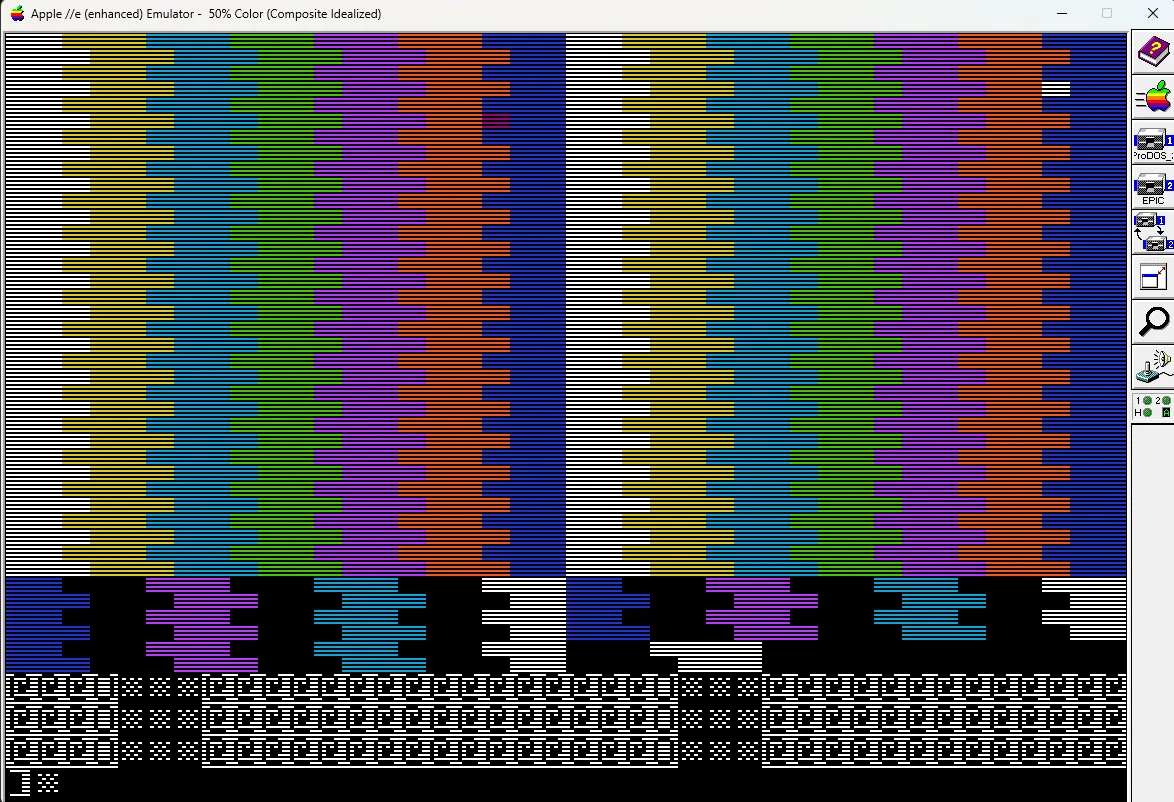
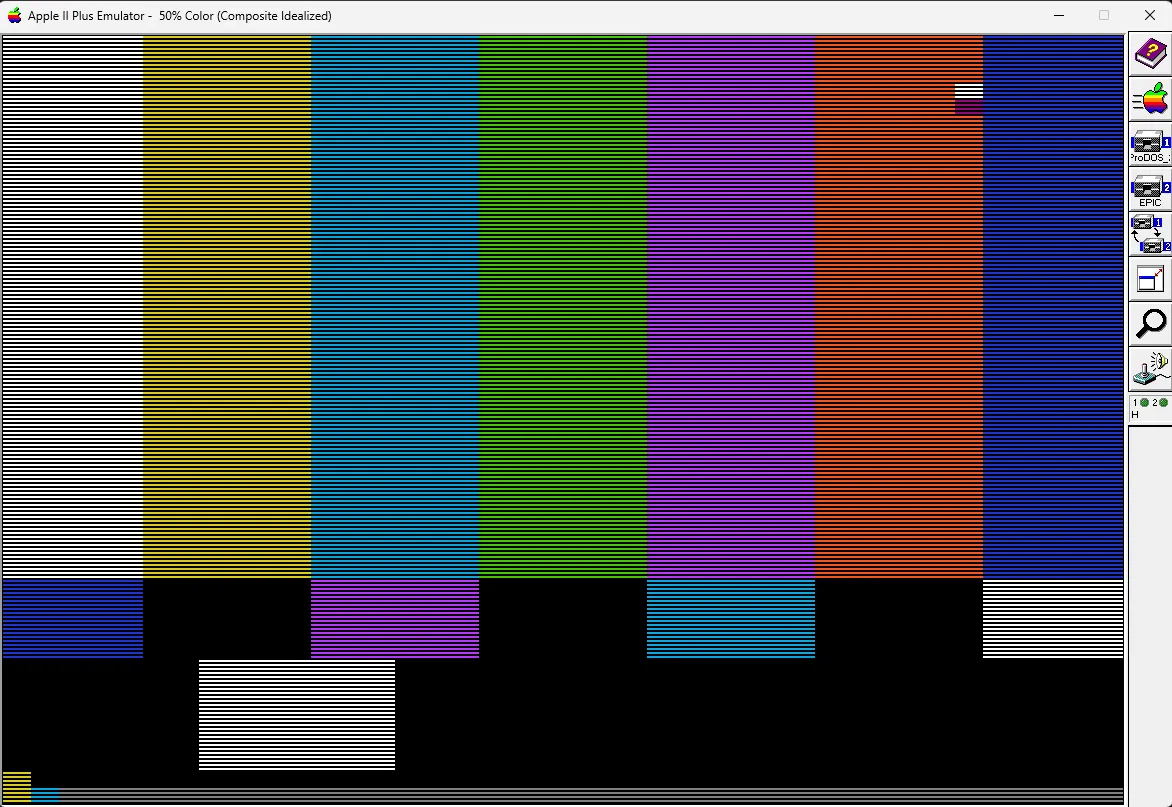
One of my attempts at converting a test-pattern image, with an incorrect memory layout. You also can see the four text rows that lo-res mode shows by default at the bottom of the screen.
With my target disk size being only the standard single-sided 140 KB, including the ProDOS and BASIC files, I decided that Hi-Res graphics would be too large for holding a lot of frames. Plus, the greater color depth of Lo-Res would hopefully make the motion in the GIFs more legible to compensate for the lack of resolution. Creating a Lo-Res image from a GIF frame was my first major milestone. I used basic nearest-neighbor scaling and Euclidian color distance to shrink the image down and reduce it to the Apple II palette. The trickiest part was figuring out the expected order to write the four-bit values out: I originally missed that the expected order is a strange three rows at a time, ordered low pixel -> high pixel on each row. Once I figured that out, I was able to manually put a generated frame onto a ProDOS and use some nifty BASIC code from this forum post to load it onto the screen in AppleWin!
You may have noticed that some colors end up very different from the expected palette match, such as the starfish example above. This is because RGB distance is not really a great way to implement quantization (reducing colors down to a fixed palette), because RGB doesn't do a good job representing how humans perceive color differences. I decided that with such a limited color palette it probably wasn't worth the extra effort to implement a more complex colorspace distance approach. I'm generally happy with the results of the basic RGB distance.
Successfully loading my first code-generated image in AppleWin!
Working around memory limitations
Loading images with that post's BASIC code worked, but it was extremely slow. The problem is that the BASIC code is loading the saved binary file into safe memory using the BLOAD function very quickly, but then copying one byte at a time into the lo-res/text memory. This shouldn't be too tough for the processor, but Applesoft BASIC's defining feature is that it does all of its math in floating-point numbers, so finding out which register to load into every time ends up being pretty taxing as it converts the integer addresses and multipliers back and forth into floating-point. It seems that back in the day most people would write some assembly code to handle this sort of image loading, but I preferred not to go that route if I could help it.
My next question was "if loading the binary as one chunk is fast, why not just load it directly into the lo-res memory?" Unfortunately, we're faced with another architecture limitation: the "screen holes" I mentioned earlier. For every 120 bytes of lo-res data, eight bytes are kept for system purposes (typically for motherboard expansions or external devices). As a result, ProDOS actually bans you from loading directly to screen memory to prevent from overwriting these holes; there's a soft switch you can disable to force an override, but then you risk messing up something. I briefly experimented with trying to copy the values of the screen holes at load time, then overwrite the memory and restore each screen hole to its previous value. But I had a hard time getting this to work, and it made the BASIC code pretty bloated, plus it's still technically unsafe anyway.
Then I read over the memory diagram again and realized what I had missed the whole time. There's actually a whole second "screen" worth of Lo-Res memory reserved directly after the default chunk. Screen 2 follows the same memory layout, but doesn't use the screen holes and as a result lets you load binary to it as you please. So at the start of the program, I flip the soft switch to display Screen 2 and full-screen lo-res graphics, then BLOAD the graphics binaries directly into that memory. The only problem is that by default Applesoft BASIC programs are loaded into Screen 2 memory by default, but this post offered a workaround that worked great. With that figured out, I was able to write the BASIC code to display the images in a loop.
Getting images to load and loop from manually loading BASIC code I wrote.
Wrong timing
In the GIF file format, each frame stores a value for how long to wait before going to the next frame, in centiseconds (weird!). As a result, the delay can change from frame-to-frame. Originally I tried to preserve this by adding in extra cycles in a FOR loop, by loading from an external binary array I generate in the program. This worked decently well, though it needed some accuracy adjustment. However, it was then I remembered a critical takeaway: always check the emulator settings. AppleWin has a setting called "Enhanced floppy disk access speed" that allows it to read from the drive way faster than a real system is able to. When I turned it off, the loading got way slower, and the added time from the wasted cycles made the GIF slow to a crawl.
For now, I have opted to never add extra time between frames. Hypothetically this results in some GIFs that wait a VERY long time between frames to run too fast, but for most normal GIFs the display is still too slow without any delay, so I think this won't matter. I've left the code in for now with a workaround to always write zero for the delay times, in case I ever find another way to optimize the program, port the code to a faster system, etc. Or I may end up adding an option to generate the program with the delays so that you can run in it in AppleWin with the enhanced disk access for a better effect.
I'm definitely disappointed that I found out the animations would run a lot slower than I expected so late in development, but I think the program is still worthwhile and can create enough motion that you can tell what it's meant to be.
Writing it by hand
One of the best parts of working on this project was that it gave me the opportunity to work entirely at my leisure, and to write my code all by hand. I had a ton of fun jumping back into C++ and making some of the smaller decisions about how the code was organized, how each method was executed, and what libraries to utilize. At the end of the day, I really enjoy programming, and choosing to do this project purely for fun was a very rewarding decision.
Credits
GifII relies on several third-party libraries that saved me a ton of time and effort, and whose authors generously made them available for use:
- Cadius: used for updating ProDOS images in C, which made my life so much easier.
- EasyGifReader: a library that makes GIF parsing extremely straightforward.
- GIFLIB: the library behind EasyGifReader, and one of the most popular C++ GIF support libraries.
Additionally, these tools were extremely useful in development and I highly recommend them to anyone interested:
- AppleWin, one of the most popular Apple II emulators and an excellent one at that. Nearly all of these screenshots were taken in AppleWin.
- Apple IIjs, another great Apple II emulator right in the browser, and the source of the screenshot at the top of this page.
- CiderPress 2, which made understanding disk images and modifying them a breeze.
- ProDOS, originally written by Apple and still maintained by John Brooks.
- Gifcap, my go-to tool for quickly making screen-recorded GIFs for several years now.